About
Klaude Fuel Gauge - AI Usage
A real-time Claude usage monitor giving individuals, teams, and businesses precise, up-to-the-second metrics, visibility, and actionable insights.
What it does
Your token budget is your Claude plan's allowance — the rolling 5-hour sessions, weekly limits, and messages it gives you. Klaude Fuel Gauge - AI Usage is a lightweight macOS menu bar app that monitors your Claude AI message quota in real-time. It silently polls the Claude API in the background and displays a color-coded fuel gauge icon — so you always know, at a glance, how much of your session and weekly allowance remains.
No browser tab open. No manual refreshing. Just a tiny icon in your menu bar that tells the truth.
There are other ways to track Claude usage — VS Code extensions, Chrome browser add-ons, terminal scripts. They all work, within their context. But if you write in one app, code in another, and research in a third, none of them follow you. Klaude Fuel Gauge - AI Usage lives in the macOS menu bar, so it's always visible regardless of which app has focus. One glance. Every app. Always on.
Plan support
Klaude Fuel Gauge - AI Usage auto-detects your Claude plan and sets the correct limits automatically. You can also override them manually.
| Plan | Session (5h) | Weekly (7d) |
|---|---|---|
| Claude Pro | Baseline allowance | Baseline allowance |
| Claude Max 5× | 5× Pro | 5× Pro |
| Claude Max 20× ★ | 20× Pro | 20× Pro |
Exact quotas are set by Anthropic and vary with model, message length, and load. Klaude Fuel Gauge - AI Usage reads your real limits live from your account — so the gauge always reflects what you actually have.
How it works
When you first launch Klaude Fuel Gauge - AI Usage, you sign in through a secure in-app window that opens claude.ai directly — the same login you'd use in a browser. The session it creates lives only inside the app's own sandboxed container; because the app is sandboxed it never reads (and physically cannot read) the cookies belonging to Safari, Chrome, or any other browser. It then uses that in-app session to call the Claude usage API and displays your current consumption as a percentage.
Your Claude credentials never leave your Mac, and no data is ever sent to us — there are no TeleCottage servers, no accounts to create, and no data collection of any kind. The only things that leave your Mac are the two you can see: usage reads to Anthropic's API, and — only if you switch on Fuel Lock — a lock-attempt email sent through your own admin-configured mail server, direct to the recipients you choose. Nothing routes through us.
One detail worth knowing: Claude's session limit is a rolling 5-hour window, not a fixed daily reset. Messages you sent more than 5 hours ago gradually free up again. Klaude Fuel Gauge - AI Usage tracks this in real time, so the number you see always reflects what you actually have available right now — not what you started with at the top of the day.
Connecting takes one secure sign-in, inside the app. Full step-by-step sign-in guide →
What the menu shows
Click the fuel-gauge icon and the full picture drops down. Every line, explained:
Day 5hr Session
| Day 5hr Session - Usage Trend ↓ | Section header. The arrow shows whether usage is climbing (↑), holding steady (→), or easing off (↓). |
| 6 / 45 (13%) · Pro | Messages used vs your session cap, as a percentage, plus your auto-detected plan tier. |
| ✉ 39 messages left | What's still in the tank this session. |
| At this pace you'll cross 70% in ~1h 53m. | Projected times until you cross the caution (70%) and warning (90%) thresholds, based on your current burn rate. |
| Today's peak: 13% | The highest usage you've hit today. |
| Session clock: 1hr 2m / 05h 00m | How far into the rolling 5-hour window you are. |
| RESETS in 3hr 57m. | Countdown to the session reset, with the exact local date and time. |
| Extra usage: $0.00 this period | Any pay-as-you-go spend beyond your plan's included quota this period. |
Range Estimator
| ~2hr 52min at this pace | Approx time till empty at your present pace — full details in the Range Estimator section below. |
Week Session
| 5 / 240 (2%) · Pro | Weekly messages used vs cap, percentage, and plan tier — with messages left and today's peak, same as the Day section. |
| Weekly clock: 2d 4hr / 7d 00h | How far into the 7-day window you are. |
| All models | This weekly quota covers usage across all Claude models. |
| RESETS in 4d 19hr. | Countdown to the weekly reset, with the exact local date and time. |
| Current Balance: AUD $111.07 | Your usage-credit balance, shown in your local currency. |
Status & controls
| ● Off-peak — good time to batch | Flags off-peak windows (weekday evenings and all-day weekends, configurable, in your local timezone) — the smart time to run heavy tasks. |
| Quick Actions › | Reset 5-hour / weekly / both windows, Manual corrections, Copy stats to clipboard, Export usage data, Pause tracking, and Lock Now (Fuel Lock) — one click, no Settings required. |
| ✓ Synced 2s ago · Polling every 60s | Sync Status: when data was last fetched and the active polling interval. |
| Help · Settings… · Refresh · Quit | Everything else lives at the bottom of the menu. |
Full feature list
Everything Klaude Fuel Gauge - AI Usage can do, in one place.
Session Tracking
Monitor your 5-hour rolling window in real-time. Know exactly how many messages remain before Claude slows you down — so you can pace yourself instead of hitting a wall.
Weekly Overview
Track your 7-day usage alongside your session limit. Get the complete picture of your Claude consumption at a glance — and spot patterns before they cost you a Monday morning.
Smart Alerts
Configurable session alerts at 70% and 90% (adjustable to any threshold), weekly alerts at 80% and 95%, and a pace alert when less than 10 minutes remain. Get nudged before you hit the wall — not after you've lost your train of thought mid-session.
Auto Tier Detection
Automatically detects your plan — Pro, Max 5×, or Max 20×. No manual configuration needed; it just works. The right limits, from the first launch.
Configurable Polling
Set refresh from 15 seconds to 2 hours. Balance live accuracy with API courtesy — your call, your cadence.
Native macOS
Built with SwiftUI and MenuBarExtra. Zero clutter, zero browser tabs — just a tiny icon in exactly the right place. Works across every app on your Mac.
Live Sync Status
Confirms when data was last retrieved (e.g. "Synced 53s ago") and displays the active polling interval. Ensures displayed figures are never stale without requiring a manual refresh.
Off-Peak Indicator
Detects whether you are currently in an off-peak period and flags it as a good time to batch high-volume tasks. Configurable peak windows for weekday evenings and all-day weekends in your local timezone.
Claude Design Tracking
If you use Claude's Design feature, a dedicated menu section tracks its separate weekly quota — percent used and remaining with its own color-coded gauge, a weekly clock, and an exact reset countdown. On by default; hide it in Settings if you don't use Design.
Compact Mode
Menu bar feeling crowded? Compact mode shortens the menu bar readout's labels so the gauge takes less space up top — same live data, smaller footprint. One toggle in Settings.
Usage Trend Arrows
Directional arrows next to session and weekly headings show whether usage is climbing, dropping, or holding steady — powered by the UsageHistory engine running silently in the background.
Quick Actions
One click from the menu: reset your 5-hour, weekly, or both windows; make manual corrections; copy stats to the clipboard; export usage data; or pause tracking. Fast control without opening Settings.
Fuel Lock
A self-control circuit breaker. Set a hard limit and Klaude Fuel Gauge - AI Usage enforces it — cross the line and a full-screen Fuel Lock takes over your entire screen, above every app, with an audible alarm, so you stop before you overspend. Unlock anytime with Touch ID or your password; threshold locks auto-unlock at your next session reset. Optionally, a lock-attempt email can be sent to your nominated admin — via your own admin-configured mail server, never through us — so usage on shared accounts stays accountable.
Manual Corrections
Manually adjust the recorded usage count if the app's tally diverges from your actual account state. Keeps the gauge accurate without waiting for an automatic resync.
Setup Assistant
A guided onboarding flow for first-time configuration, plus an on-demand setup verification tool to diagnose connection or configuration issues at any time.
Automatic Updates
Updates arrive automatically through the Mac App Store — no manual checks needed. Keeps the app current with any changes to Claude's API response format or rate-limit structure.
Secure Sign-In
Authenticate your Claude account directly within the app to authorise usage data retrieval. Your credentials never leave your Mac.
Range Estimator
Predicts how long your current session quota will last at your present messaging pace. Uses a rolling burn rate with exponential decay weighting — recent activity counts more than older data. Shows estimates like ~14 min at this pace in the menu, and fires a dedicated alert when you’re less than 10 minutes from empty.
Apple Shortcuts
Wire Klaude Fuel Gauge - AI Usage into Apple Shortcuts and Siri. Seven live actions expose session state, usage percentage, messages remaining, time to empty, time to reset, plan tier, and pause tracking. Threshold events can trigger your own Shortcuts automatically — switch Focus Mode, set Reminders, log usage to a spreadsheet, and more.
The Whole Picture — One Page
Want everything at a glance? Our interactive infographic walks the full story — the Claude Wall problem, the colour-coded fuel tank, the live menu bar readout, every feature, and the 60-second setup flow.
Range Estimator
The Range Estimator predicts how long your current 5-hour session quota will last at your present messaging pace.
How it works
Each time the app polls your Claude usage, it records a data point in a rolling time window. It then calculates a burn rate (messages consumed per second) using exponential decay weighting — recent activity carries more weight than older data. That rate is projected forward to estimate when your remaining messages will run out.
A minimum of 2 data points with a positive usage delta are required before an estimate is displayed. If usage is idle or insufficient data exists, the placeholder “Measures burn rate, estimates your remaining mileage.” is shown instead.
Display formats
The estimate appears in the menu under Range Estimator (Approx Time Till Empty): using the following formats:
| Remaining time | Example |
|---|---|
| Under 1 minute | < 1 min at this pace |
| 1–59 minutes | ~5 min at this pace |
| Exact hours | ~1hr at this pace |
| Hours and minutes | ~2hr 30min at this pace |
Color coding
The estimate text is color-coded based on time remaining — independently of the session gauge color:
| Time to empty | Color | Example |
|---|---|---|
| Under 5 minutes | 🔴 Red | < 1 min at this pace |
| 5 – 30 minutes | 🟠 Orange | ~5 min at this pace |
| 30 minutes – 2 hours | 🟡 Yellow | ~1hr at this pace |
| 2 hours or more | 🟢 Green | ~2hr 30min at this pace |
Diagnostics & testing
A built-in test is available under Settings → Diagnostics → Test Range Estimator. Clicking the button opens the main menu automatically, waits 2 seconds, then injects mock usage data and cycles through all four display format examples — each shown for 5 seconds. The label shows Range Estimator (Approx Time Till Empty): TEST while the test is active. Test data is cleared automatically after 27 seconds.
Apple Shortcuts Integration
Klaude Fuel Gauge - AI Usage connects to Apple Shortcuts in two directions: it exposes live session data as actions you can use in any shortcut, and it can automatically trigger your own Shortcuts when usage thresholds are reached.
Available Shortcuts actions
These four actions appear in Shortcuts.app under the Klaude Fuel Gauge - AI Usage category, and are also available via Spotlight and Siri:
| Action | Returns | Description |
|---|---|---|
| Get Claude Session Usage | Number 0–100 | Current 5-hour session usage as a percentage |
| Get Claude Messages Remaining | Number | Messages left in the current 5-hour session |
| Get Claude Session State | Text | Color-coded state: green, yellow, orange, red, or stop |
| Get Claude Time to Empty | Number (minutes) | Estimated minutes until session limit; −1 if not yet computable |
Two pre-built Shortcuts appear automatically in Spotlight and Siri — no setup required. You can also ask Siri directly: "How long until my Claude session ends?"
Threshold firing
Configure Klaude Fuel Gauge - AI Usage to run a named Shortcut automatically when a threshold triggers. Go to Settings → Shortcuts and enter the exact name of a Shortcut you've created in Shortcuts.app for any of the four triggers below:
| Trigger | When it fires |
|---|---|
| Run when caution fires | Session crosses the caution threshold (default 70%) |
| Run when warning fires | Session crosses the warning threshold (default 90%) |
| Run when pace alert fires | Time to empty drops below 10 minutes |
| Run when session resets | A new 5-hour session window is detected |
Example automations
Switch to Do Not Disturb when your session hits 90%. Create a Reminder when the pace alert fires. Log usage to a Numbers spreadsheet at each threshold crossing. Turn off Do Not Disturb automatically when your session resets. The current usage percentage is passed to your Shortcut as its input — use it in an If block to branch your logic.
Notifications
Klaude Fuel Gauge - AI Usage fires macOS notifications when usage crosses configured thresholds. Each alert fires once per crossing — it will not re-fire until usage drops below the threshold and crosses it again (for example, after a session reset).
Session alerts
| Alert | Default threshold | Adjustable |
|---|---|---|
| Session caution | 70% | 1–99% via slider |
| Session warning | 90% | 1–99% via slider |
| Pace alert | Time to empty < 10 min | On/off only |
Weekly alerts
| Alert | Default threshold | Adjustable |
|---|---|---|
| Weekly caution | 80% | 1–99% via slider |
| Weekly critical | 95% | 1–99% via slider |
Snooze
Enable Snooze in Settings → Notifications to have any alert re-fire after a delay you choose (5 to 120 minutes). Useful when you want a reminder but aren't ready to act immediately. Snooze is available for all session and weekly alerts.
Tip: Set the alert style to Persistent in System Settings → Notifications → Klaude Fuel Gauge - AI Usage so alerts remain on screen until manually dismissed.
Frequently Asked Questions
"Token budget" is our shorthand for your Claude plan's allowance. Claude.ai meters that allowance in messages across rolling 5-hour sessions and weekly limits — and that's exactly what Klaude Fuel Gauge - AI Usage tracks, in real time, from your menu bar.
You sign in through a secure in-app window that opens claude.ai directly — the same login you'd use in a browser. The session it creates lives only inside the app's own sandboxed container; the app never reads, and being sandboxed cannot read, the cookies belonging to Safari, Chrome, or any other browser. Using that in-app session, it calls Anthropic's usage API directly from your Mac.
There is no middleman. Your Mac talks directly to Anthropic's servers, exactly the same way your browser does. No data passes through any third-party infrastructure, and nothing is stored outside your device.
Fuel Lock is an opt-in self-control feature. You set your own hard usage limit, and when you cross it, a full-screen lock takes over your entire screen, above every app, with an audible alarm — a deliberate speed bump so you stop before overspending your quota. You can unlock early with Touch ID or your password, or wait for it to release automatically at your next session reset.
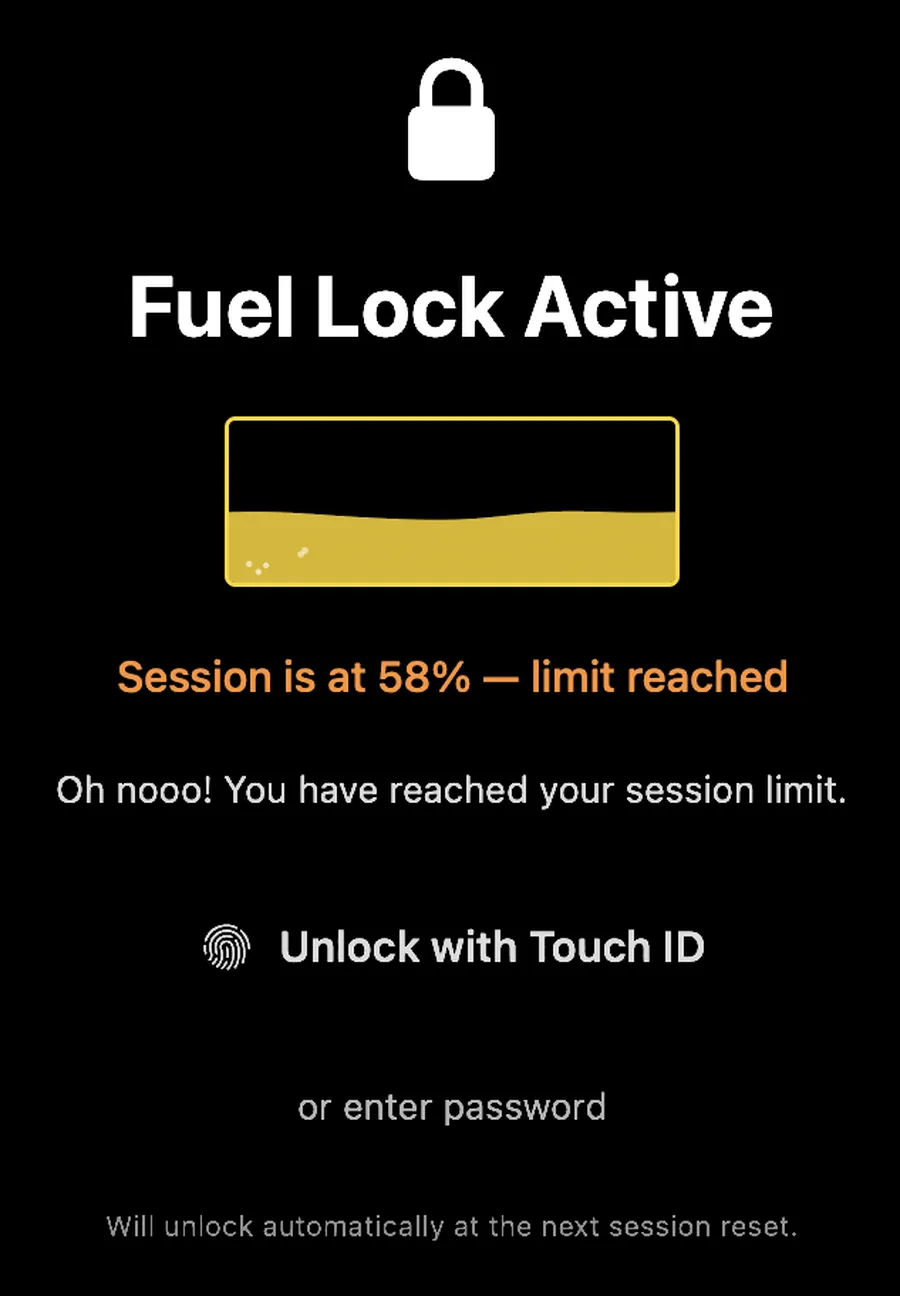
For shared or team accounts, you can optionally have a lock-attempt email sent to a nominated admin — delivered through your own configured mail server, direct to recipients you choose. Nothing routes through us, and if Fuel Lock is off (the default), no email capability exists at all.
Yes. You sign in through a secure in-app window that loads claude.ai directly — the app never sees your password (Anthropic handles the login). The session tokens it receives live only in the app's own sandboxed container on your Mac and are used to fetch your usage percentage. That's all — they're never shared with your browser or sent to anyone but Anthropic.
The tokens are stored in the app's own sandboxed container on your Mac — isolated from every other app by macOS sandboxing — and never transmitted to anyone except Anthropic's own API. The app cannot read your conversations, change your account settings, or take any action on your behalf.
For full details, see our Privacy Policy.
Klaude Fuel Gauge - AI Usage uses the same session-based API your browser uses at claude.ai, so it's subject to whatever Anthropic changes over time. Realistically, Anthropic makes these changes occasionally, and we update the app to match — just as any third-party tool does.
If the API changes and a fix is needed, we push an update. If Anthropic ever releases an official, sanctioned usage-monitoring API, we'll migrate to it immediately. And if something breaks in the meantime and you're within your refund window, Apple will give you your money back — no questions asked (see the refund question below).
You need an active Claude Pro, Max 5×, or Max 20× subscription. Klaude Fuel Gauge - AI Usage tracks the message quota that comes with these paid plans — that's the number it reads and displays.
The free Claude tier doesn't expose the same quota data via the API, so the app has nothing meaningful to show. If you're on the free tier and regularly hitting Claude's limits, that's usually a sign a paid plan would save you real time — and Klaude Fuel Gauge - AI Usage is built to help you get the most out of it once you do.
Yes. Klaude Fuel Gauge - AI Usage runs natively on both Apple Silicon (M1 and later) and Intel Macs. The minimum requirement is macOS 14 Sonoma — if your Mac can run Sonoma, it can run Klaude Fuel Gauge - AI Usage.
Yes. Klaude Fuel Gauge - AI Usage is sold exclusively through the Apple Mac App Store, which means Apple's standard refund policy applies. If the app doesn't work as expected, request a refund directly through Apple within 14 days of purchase — Apple processes it, no involvement from us required.
To request a refund, visit reportaproblem.apple.com, sign in with your Apple ID, find the purchase, and select "Request a refund." It takes a minute and Apple is generally straightforward about it.
Klaude Fuel Gauge - AI Usage monitors usage on the Claude.ai subscription platform — the account you use at claude.ai in your browser. It tracks the message quota that comes with your Pro or Max plan.
It does not monitor usage billed through the Anthropic developer API (api.anthropic.com), which operates on a pay-per-token basis with no fixed message limit. If you access Claude exclusively through the API with your own key, this app isn't the right tool for that use case.
Right now, Klaude Fuel Gauge - AI Usage is built exclusively for Claude. The integration goes deep — reading native session data and speaking directly to Anthropic's API — so supporting other services isn't simply a matter of flipping a switch.
That said… we're not exactly sitting still. Let's just say the name Klaude wasn't chosen entirely by accident, and what we're quietly working on next might make that silent 'K' start to make a lot more sense. Watch this space. 👀
Free alternatives exist — VS Code extensions, Chrome browser add-ons, command-line monitors — and they're genuinely useful if you live inside a single tool. But they only show you your quota when that specific app is in focus. If you use Claude across multiple apps throughout your day, you're blind the moment you switch context.
Klaude Fuel Gauge - AI Usage is a native macOS app. It lives in your menu bar, which means it's always visible, regardless of which app you're in. It's also built with SwiftUI — not a browser extension or an Electron wrapper — so it's fast, lightweight, and feels like it belongs on your Mac.
Ready to stop flying blind
on your Claude quota?
Everything you just read ships in one lightweight menu bar app.
One-time purchase. No subscription.
Price in USD · local price & any applicable taxes (GST/VAT) are set by the App Store and shown at checkout.
macOS 14 Sonoma or later · Requires Claude Pro or Max plan · macOS Menu Bar App